AI Development / Tech
Real-time Edit Reflection and Diff Display with Emacs
Share on X
ON AIR
0:00
--:--
RADIO
☰
Table of Contents
I’ve been experimenting with the environment for software implementation using WSL + OpenCode recently.
The requirements are:
- Issue commands to an agent via CUI
- Display the editor in separate areas (preferably showing differences)
Current Configuration
Although VSCode would be suitable, I prefer using CUI for personal preference.
Currently, the setup is as follows:
- WezTerm (a Rust-based terminal software for multi-platform, capable of screen splitting)
- Emacs (installed on WSL, using the CUI version within WezTerm)
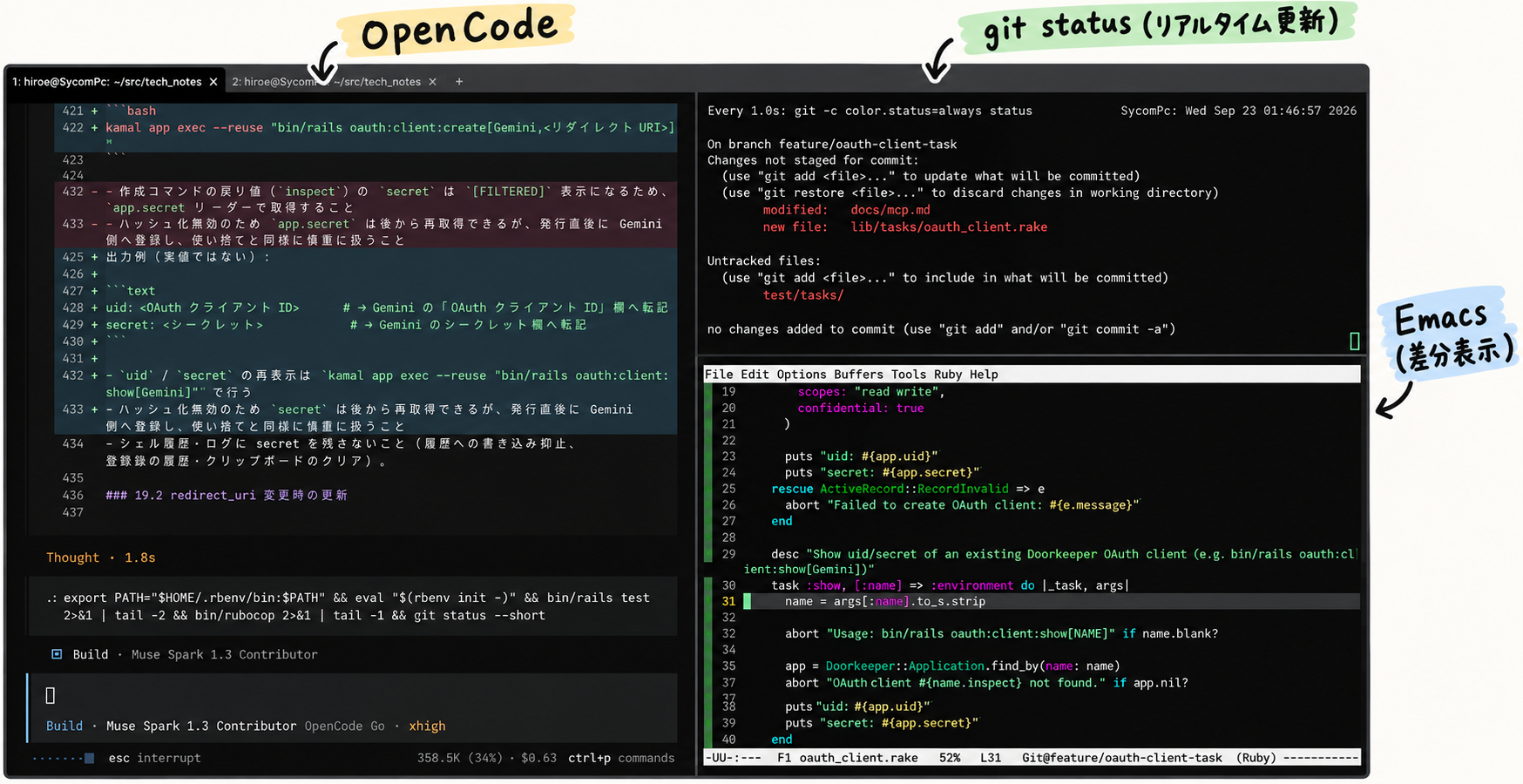
I’m using Emacs because I’m familiar with it. It’s been a while since I used it, but my fingers remembered.
I’ve enabled diff-hl-mode in Emacs to show differences and configured it to reflect file changes in real time.
This way, when the AI agent modifies a file, added or deleted lines are visible in real time.
Execution content in each WezTerm window:
- Left:
sbx run opencode - Top right:
watch -n 1 --color 'git -c color.status=always status' - Bottom right:
emacs -new <filename>
Emacs Configuration
;; Display Git diffs
(global-diff-hl-mode 1)

(unless (display-graphic-p)
  (diff-hl-margin-mode 1))

;; Automatically refresh buffer when file is changed
(global-auto-revert-mode 1)
(setq auto-revert-use-notify t)

(diff-hl-flydiff-mode 1)

;; Enable diff display for new files
(defun my-diff-hl-intent-to-add-untracked ()
  "Make an untracked visited file visible to Git diff."
  (when-let* ((file buffer-file-name)
              (root (locate-dominating-file file ".git")))
    (let ((default-directory root))
      (unless (= 0 (call-process
                    "git" nil nil nil
                    "ls-files" "--error-unmatch" "--" file))
        (call-process "git" nil nil nil
                      "add" "-N" "--" file)

        (when (bound-and-true-p diff-hl-mode)
          (diff-hl-update))))))

(add-hook 'find-file-hook #'my-diff-hl-intent-to-add-untracked)
(add-hook 'after-revert-hook #'my-diff-hl-intent-to-add-untracked)
How to Use WezTerm
I don’t fully understand it myself.
As a start:
- Horizontal screen split: press
Ctrl-Alt-Shift-%simultaneously - Copy:
Ctrl-Shift-C - Paste:
Ctrl-Shift-V
Comments
No comments yet.