A Little Hiccup with Route53 Resolver
A trivial matter.
When using Aurora for PostgreSQL on AWS, during the migration period from on-premises, we need to access Aurora from on-premises. Since Aurora’s writer and read replicas can switch due to maintenance or outages, the IP address can change. Therefore, it’s not possible to access Aurora with a fixed IP address from on-premises.
For example, in this diagram, write queries are directed to the Aurora instance ap-northeast-1a, which is the writer.
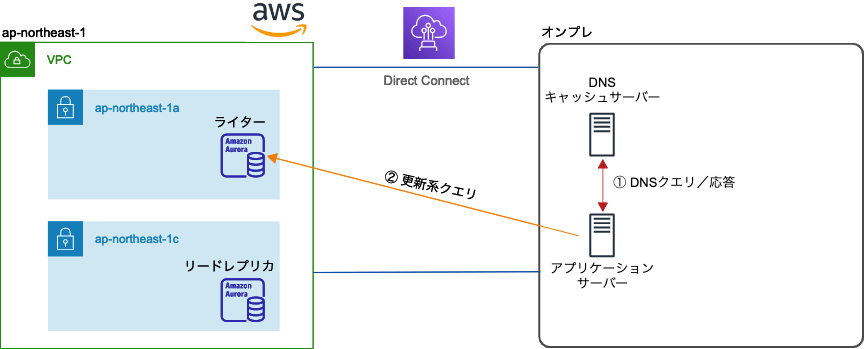
However, if the writer and read replica switch due to maintenance or an outage, and the on-premises side has a fixed writer address, it results in:
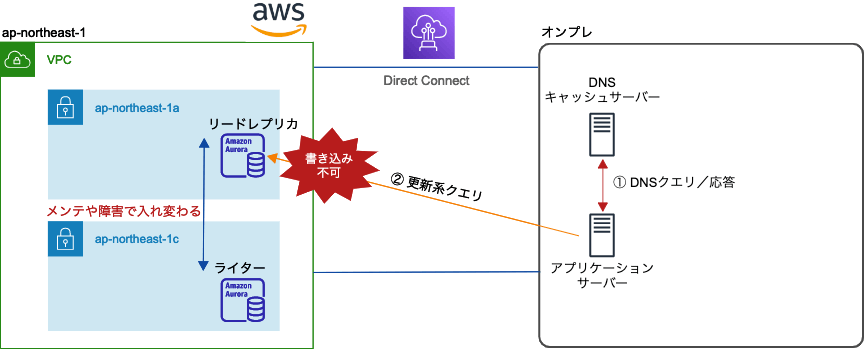
and you can’t write.
Although there is a slight delay in VPC instances, the IP address changes accordingly to follow the new writer, so it’s generally not an issue. Therefore, we need to inform the on-premises side of the new writer’s IP address.
Here comes Route53 Resolver.
Route53 Resolver has inbound and outbound, and this time we use inbound.
The setup for Route53 Resolver is simple. You can do it by clicking on the console, or with Terraform as follows:
// Route53 Inbound
resource "aws_security_group" "route53_resolver_sg" {
  name   = "route53_resolver_sg"
  vpc_id = "VPCのid"
}

resource "aws_security_group_rule" "inbound_udp_route53_resolver" {
  type      = "ingress"
  from_port = 53
  to_port   = 53
  protocol  = "udp"
  cidr_blocks = [
    "オンプレのCIDR"
  ]
  security_group_id = aws_security_group.route53_resolver_sg.id
}

resource "aws_security_group_rule" "inbound_tcp_route53_resolver" {
  type      = "ingress"
  from_port = 53
  to_port   = 53
  protocol  = "tcp"
  cidr_blocks = [
    "オンプレのCIDR"
  ]
  security_group_id = aws_security_group.route53_resolver_sg.id
}

resource "aws_route53_resolver_endpoint" "my_inbound" {
  name      = "my_inbound"
  direction = "INBOUND"
  security_group_ids = [
    aws_security_group.route53_resolver_sg.id
  ]

  ip_address {
    subnet_id = "サブネット1のid"
    ip        = "10.0.0.12"
  }

  ip_address {
    subnet_id = "サブネット2のid"
    ip        = "10.0.1.12"
  }
}
With this setup, DNS queries on ports 53 are accepted at 10.0.0.12 and 10.0.1.12, allowing name resolution similar to instances within the VPC. Note that Route53 Resolver requires at least two network interfaces.
Then, on the on-premises DNS cache server, configure the namespace to forward to AWS’s local DNS.
For example, with unbound:
forward-zone:
      name: "amazonaws.com"
      forward-addr: 10.0.0.12
      forward-addr: 10.0.1.12
Or with bind:
zone "amazonaws.com" {
type forward;
forward only;
forwarders {
10.0.0.12;
10.0.1.12;
};
};
With this, name resolution for `xxx.amazonaws.com` is forwarded from the local cache server to Route53 Resolver, and it resolves correctly. Even if the Aurora writer's address changes, Route53 Resolver will return the updated address.
For example, under normal conditions, it looks like this:

Even if the writer's address changes due to maintenance or an outage, name resolution for `xxx.amazonaws.com` is forwarded to Route53 Resolver, allowing it to follow the address change.

Well, that's good, but...
## The Hiccup
I have set up my own local records using Route53 aliases and CNAMEs for VPC hosts and Aurora. Suppose it's `my-vpc.com`, and for Aurora, I obtained the writer's address as `aurora-writer.my-vpc.com`. Therefore, I configured the local cache server as:
```:/etc/unbound/unbound.conf
forward-zone:
name: "my-vpc.com"
forward-addr: 10.0.0.12
forward-addr: 10.0.1.12
However, when I tried:
$ nslookup aurora-writer.my-vpc.com
it timed out and didn’t return an IP address. After about 5 minutes, it worked, but I wondered why. It turned out that because Aurora uses a CNAME, Route53 Resolver returns the CNAME-resolved domain name. Therefore, I needed to also set up that domain name (amazonaws.com) to resolve properly.
The correct configuration is:
forward-zone:
      name: "my-vpc.com"
      forward-addr: 10.0.0.12
      forward-addr: 10.0.1.12

forward-zone:
      name: "amazonaws.com"
      forward-addr: 10.0.0.12
      forward-addr: 10.0.1.12
With this, the following happens:
- Route53 Resolver returns the CNAME for
aurora-writer.my-vpc.com, which is ‘rdb-cluster-instance-1-ap-northeast-1c.xxxxxxxxxxxx.ap-northeast-1.rds.amazonaws.com’. - Then, Route53 Resolver is queried again for ‘rdb-cluster-instance-1-ap-northeast-1c.xxxxxxxxxxxx.ap-northeast-1.rds.amazonaws.com’.
- The writer’s IP address is obtained.
As mentioned earlier, it was a trivial matter once understood.
Comments
No comments yet.