Minimum Server Configuration for a Personal Blog (This Blog's Configuration)
How Much to Spend on a Personal Blog
This article verifies how much it would cost to set up a minimal server configuration for personal use today, based on the server configuration of this blog.
This Blog’s Server Configuration / Development Tool Configuration
First, here is an overview image of the entire setup.
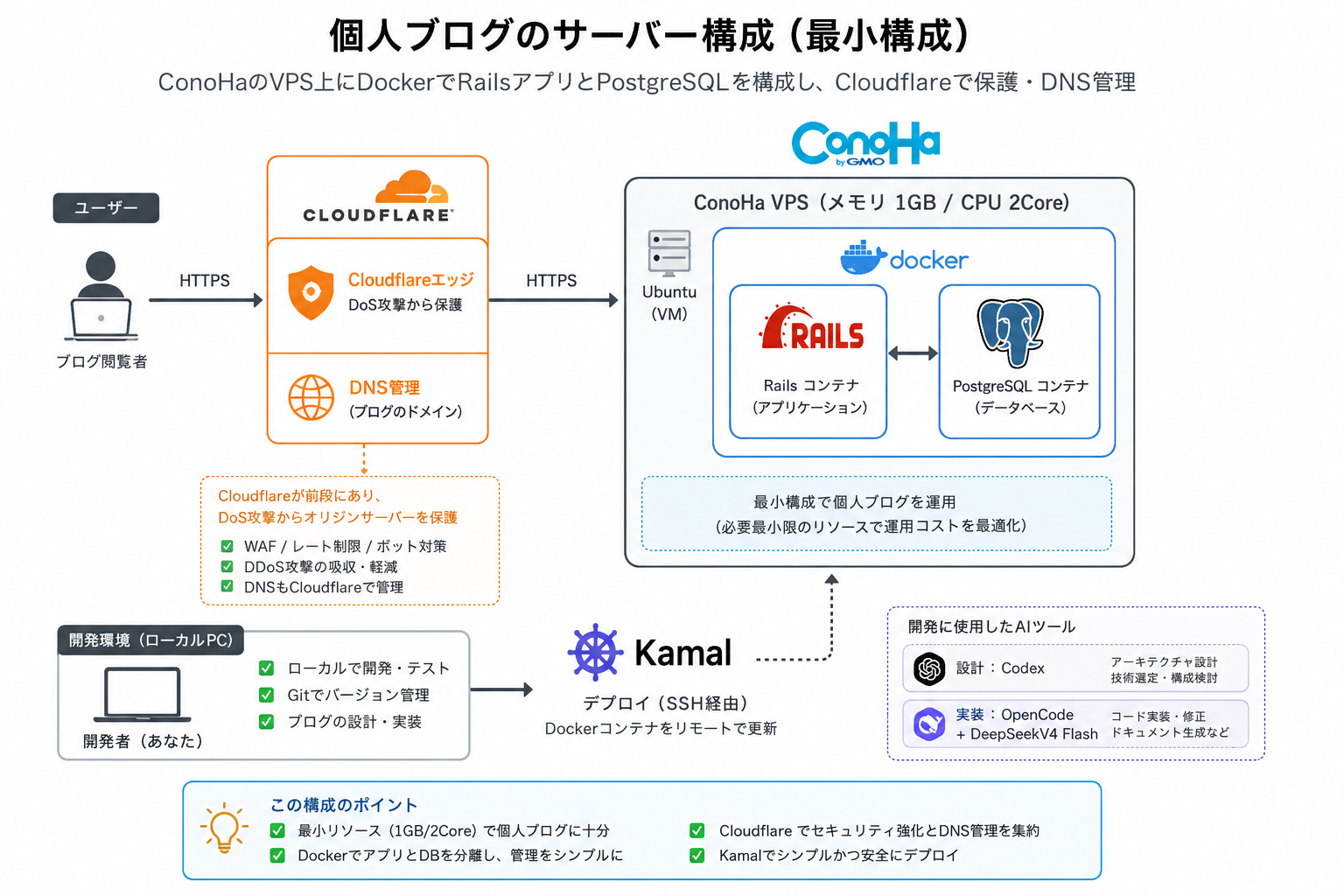
Server and Network Costs: ¥916/month
First, let me introduce the configuration of this blog.
As shown below, the basic service configuration consists of ConoHa VPS and Cloudflare.
ConoHa VPS is a server with 1GB of memory and 2 cores, costing ¥763/month, which is very inexpensive.
In addition, Cloudflare is free, but there is an annual fee of 11.53 USD (1844 JPY) for domain registration.
Backups are handled using Cloudflare R2, which is S3-compatible, but so far it is within the free tier and no charges apply.
Calculating roughly, this comes to
¥763 (server fee) + ¥153 (domain monthly fee) = ¥916/month
which is a manageable amount for an individual.
Configuration Elements
Now let’s look at each configuration element individually.
Server (VPS)
After considering various options, I use the ¥763/month server from ConoHa.
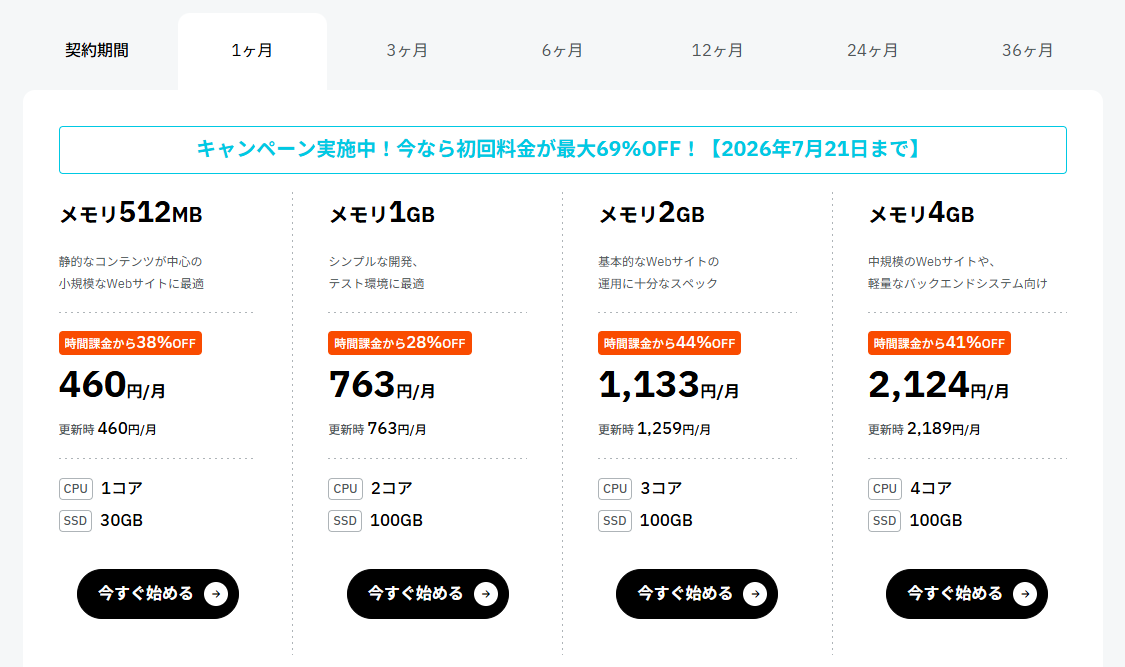
This server charges on a pay-as-you-go basis, which can cost around ¥1000/month. Therefore, it’s advisable to use the pay-as-you-go model until you’re confident this server is sufficient, and then switch to the monthly plan if it seems adequate for the future. Notably, there’s an option to pay for 3, 6, or up to 36 months, which reduces the monthly cost of the same server to an incredible ¥466.
However, I recently learned about “Shin VPS,” which offers an astonishing price of ¥325/month for 1GB of memory.
For a personal blog, 1 Core is sufficient for the CPU, and ensuring enough memory for running Rails is more critical. This 1 Core 1GB plan is excellent.
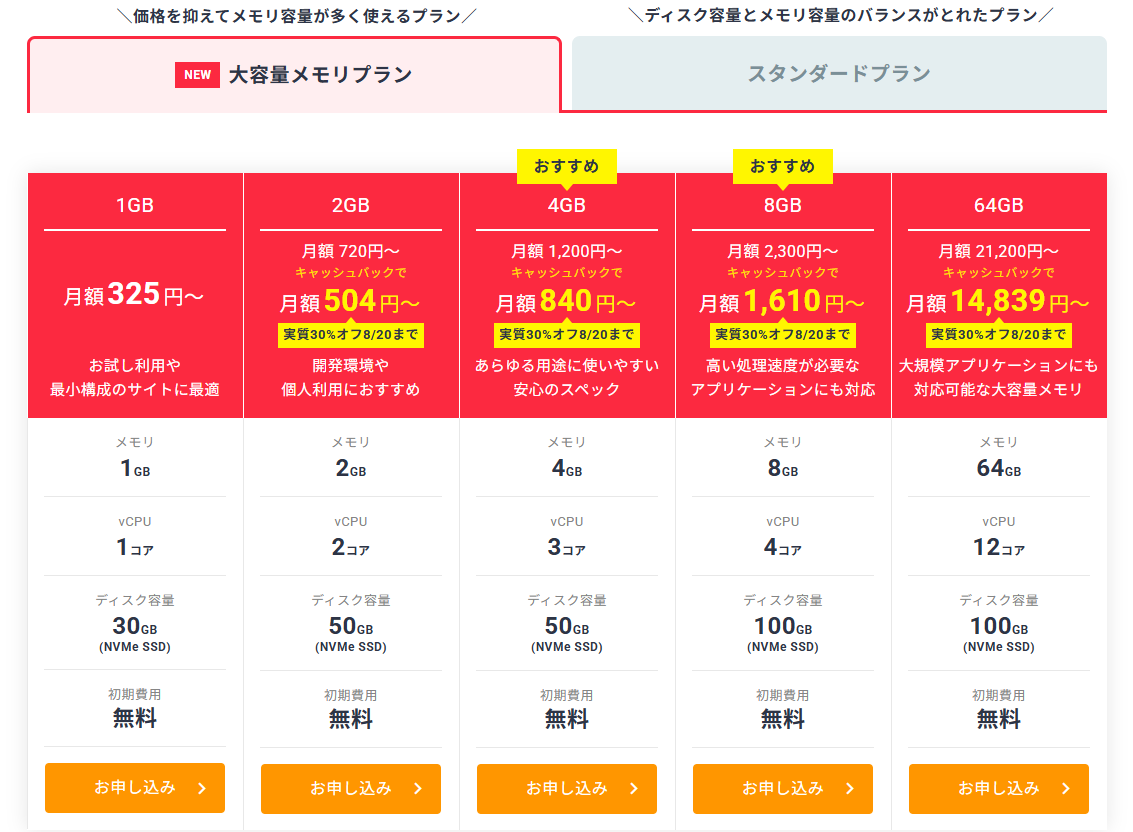
I plan to try this soon.
DNS
When publishing a server, a domain is essential, which can be contracted through Cloudflare.
Contracting DNS through Cloudflare also includes security features introduced later, making it recommended.
Firewall & CDN
As mentioned above, contracting a domain through Cloudflare includes WAF and CDN for free.
Securing the network through AWS or Azure would cost significantly more, making this a great advantage.
Development Tool Costs: ¥4600/month
The following are the development tools. Note that the cost of a personal PC is separate.
- Editor (VSCode): Free
- Framework (Ruby On Rails): Free
- Interface ideation and image creation (ChatGPT): ¥3000/month
- AI design and specification writing (Codex): Free (included in the ChatGPT plan)
- AI development (OpenCode Go): ¥1600/month
This totals ¥4600/month.
I’m considering stopping ChatGPT and Codex if they can be fully replaced by OpenCode.
Conclusion
Using services like ConoHa or Shin VPS can significantly reduce server costs.
For network infrastructure, Cloudflare is the clear choice. It’s extremely helpful that such advanced features are available for free.
Additionally, AI-related costs are still significant.
While not using Claude is somewhat better, Codex might be worth discontinuing.
It’s enjoyable to consider various minimal configurations for stable operations.
Comments
No comments yet.