How Cloudflare's DNS Protects Servers from Cyber Attacks
There are many DNS services, and you can even operate your own DNS server.
However, I’ve been using Cloudflare’s DNS more recently.
The reason is that Cloudflare’s DNS service doesn’t just perform name resolution, but also blocks cyber attacks targeting the origin server.
Typically, DNS only returns IP addresses in response to client queries, and there’s not much mechanism to protect the origin server.
So what’s different about Cloudflare’s DNS? The IP address returned for queries isn’t the origin server (Web server) IP address, but Cloudflare’s own edge location IP address.
It’s hard to explain in words, so let’s look at the image.
First, the normal DNS traffic flow. Setting “Proxy” to OFF in Cloudflare’s DNS record management screen will result in the same behavior.
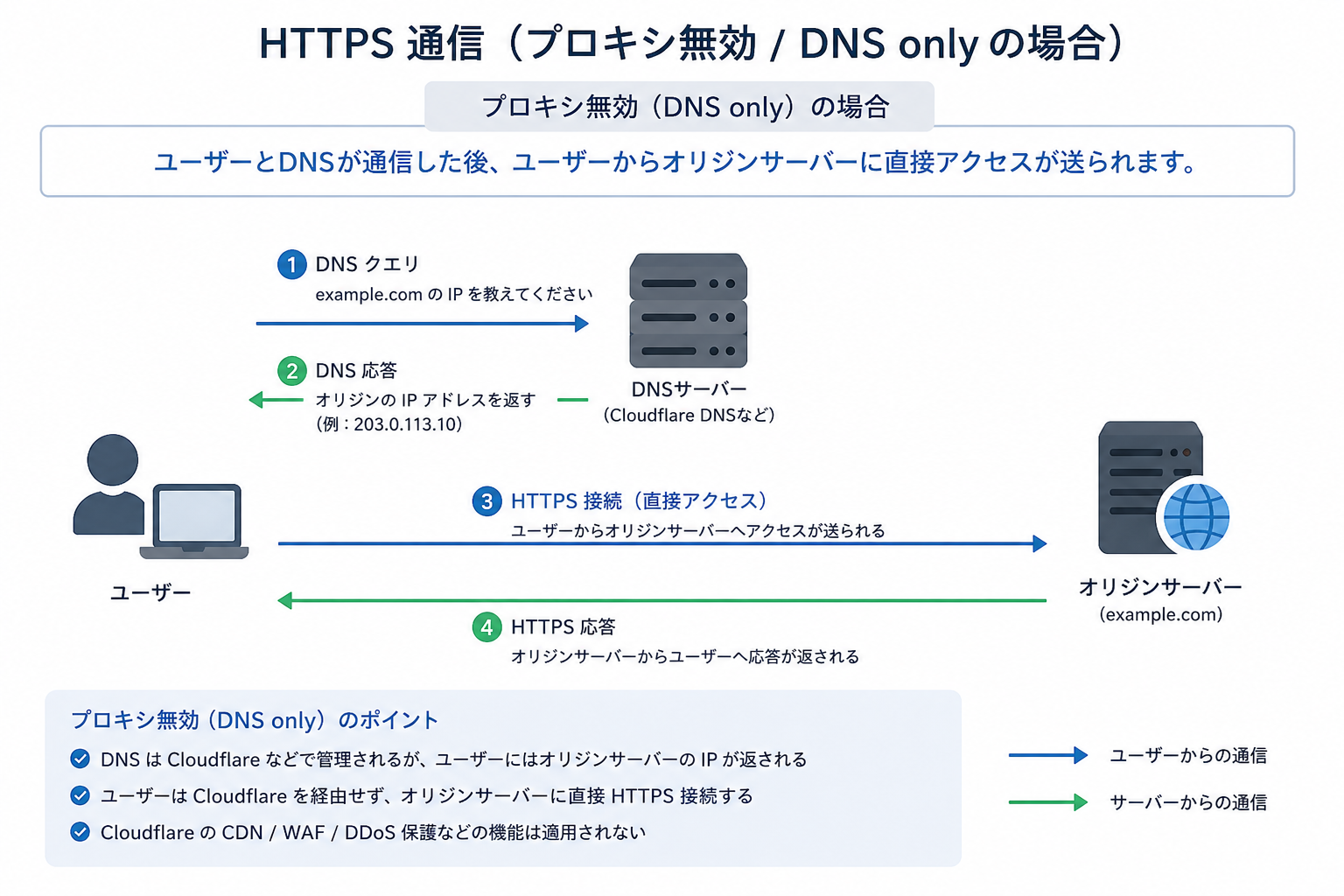
This is a normal DNS flow, nothing special.
Next, when Cloudflare DNS service has “Proxy” enabled.
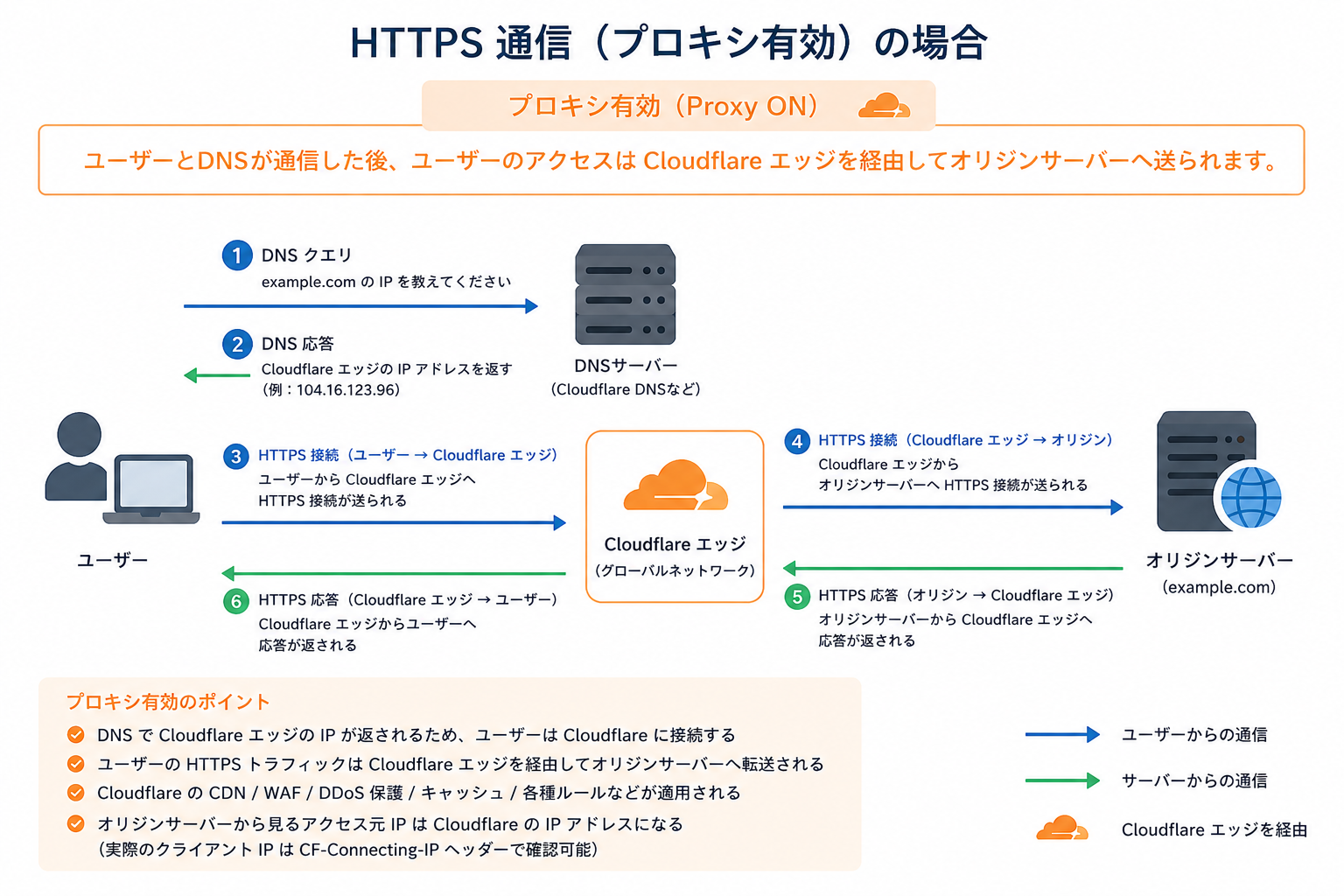
As shown in the image, enabling “Proxy” inserts Cloudflare’s edge location between the user (browser) and the origin server.
This protects the origin server from cyber attack traffic.
Moreover, although DNS name resolution itself is paid, this proxy function is free.
By the way, this blog also uses Cloudflare’s DNS, and the proxy is enabled.
Just enable Proxy on Cloudflare DNS Management Screen

As shown above, simply enabling the Proxy for the target record on the Cloudflare management screen activates this function.
Is an SSL/TLS certificate required on the origin side?
Yes. The origin side must create a certificate (using Let’s Encrypt or anything else) and enable SSL/TLS, otherwise traffic between Cloudflare and the origin server won’t be encrypted.
Important Note: Direct Attacks on the Origin Server Can’t Be Prevented
As a note, while Cloudflare’s edge protects against attacks via FQDN, it can’t prevent direct attacks on the origin server using its global IP address.
Therefore, the origin server needs countermeasures such as blocking access from outside Cloudflare using server or cloud provider functions.
The IP addresses used by Cloudflare to access the origin are publicly available on the following site:
IP Ranges
IPv4
103.21.244.0/22
103.22.200.0/22
103.31.4.0/22
104.16.0.0/13
104.24.0.0/14
108.162.192.0/18
131.0.72.0/22
141.101.64.0/18
162.158.0.0/15
172.64.0.0/13
173.245.48.0/20
188.114.96.0/20
190.93.240.0/20
197.234.240.0/22
198.41.128.0/17
IPv6
2400:cb00::/32
2606:4700::/32
2803:f800::/32
2405:b500::/32
2405:8100::/32
2a06:98c0::/29
2c0f:f248::/32
If you block IP addresses other than the above on the origin side, it will provide a sufficient level of security for personal use.
By the way, the server running this blog is a ConoHa VPS, and I have configured the ConoHa security group to block access to the server except from Cloudflare.
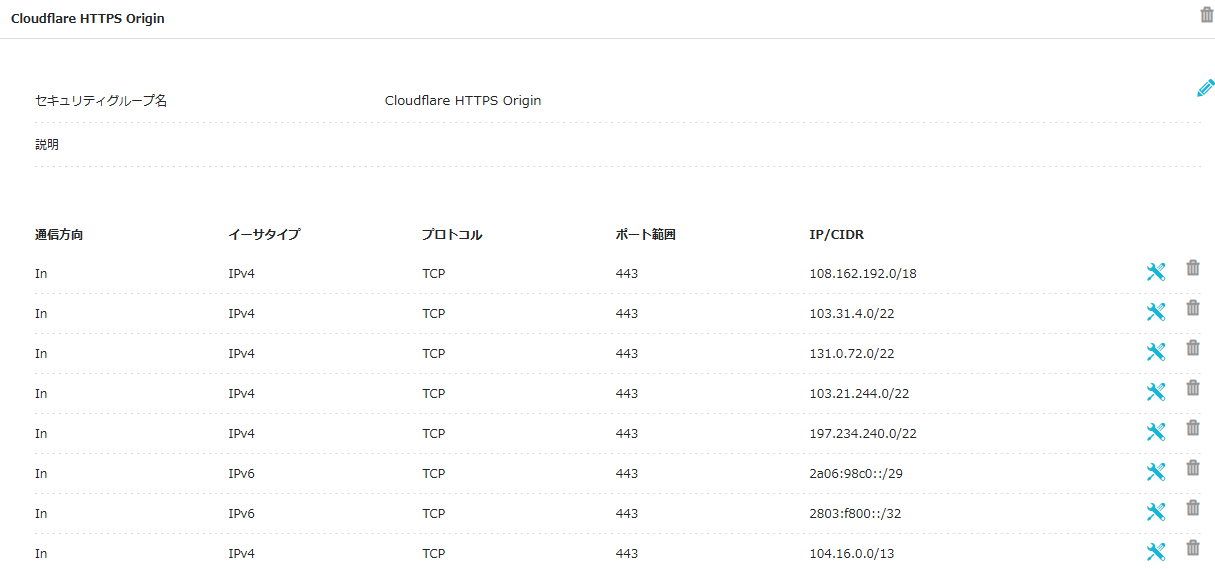
Additional Notes
Two more points to note:
- Cloudflare’s source IP addresses are occasionally replaced once a year, so it’s necessary to check them occasionally.
- Both IPv4 and IPv6 settings are required for Cloudflare DNS registration and origin-side security settings. If only IPv4 is set, the origin can be accessed directly via IPv6.
I think Cloudflare is really a great service. I hope it continues to grow.
Comments
No comments yet.